We had a reassuring result: in Chiado, applying Exposure through a fully white mask produced the same pixels as applying it globally. That remained true across several backgrounds and rendering paths. It showed that our own implementations agreed. It did not show that Lightroom treated the two operations identically.
Make the comparison external
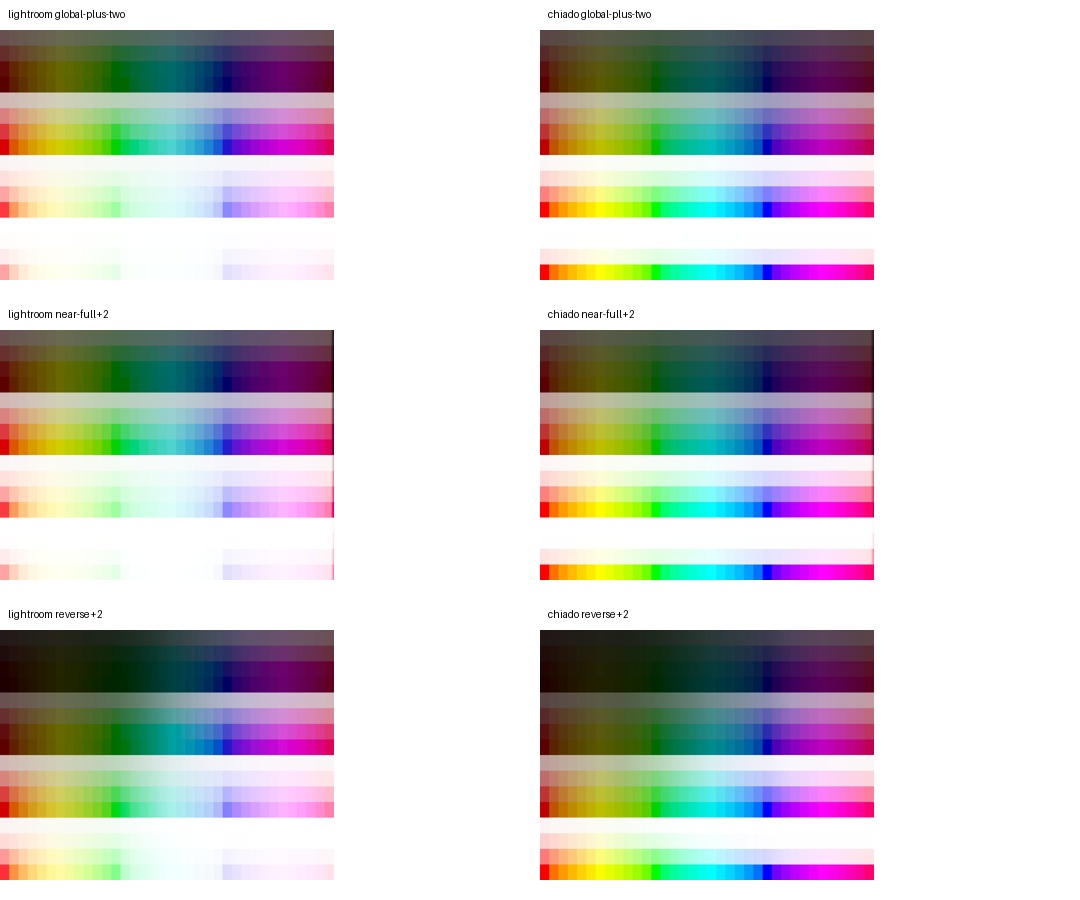
We exported a synthetic RAW chart from Lightroom with global Exposure and with the same nominal Exposure inside a linear gradient. We tested −1 and +2 stops. A zero-strength mask and a repeated baseline checked that the capture sequence itself was stable.
Those controls matched exactly at the eight-bit precision used for this diagnostic. The gradient’s unaffected region also stayed unchanged. But in the region intended to have full mask weight, Lightroom’s local and global results differed slightly. Chiado’s matched exactly.
Challenge the first explanation
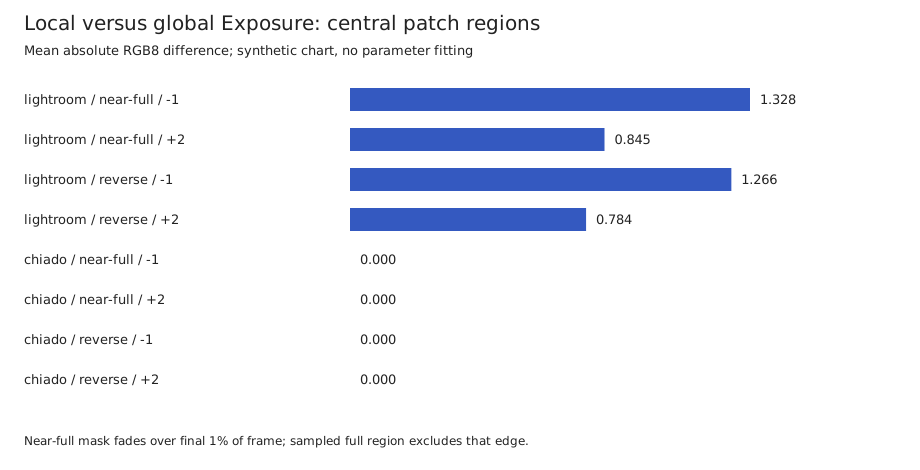
A partial gradient changes the surrounding image. Perhaps that context explained the difference. We repeated the experiment with a mask that was full strength over the first 99% of the frame, and with the original gradient reversed. We measured the central portions of chart patches to avoid their boundaries.
The local/global difference persisted. Lightroom’s mean absolute RGB difference was about 0.8–1.3 eight-bit codes in the measured full-weight regions. Chiado’s was zero. Reversing the gradient made the original direction an unlikely sole explanation; the nearly full-frame result also narrowed the context hypothesis. Neither experiment reveals Adobe’s processing order.
Verify the measurement path too
The automation needed two corrections. Lightroom’s controller could report a new local Exposure while its catalog settings still held the earlier value; ending adjustment tracking made the saved value available. Lightroom also removed empty mask lists after rendering. We now reset masks between variants and accept an omitted list only when we requested no masks. A missing requested mask still fails verification.
The Exposure measurements above are synthetic preview diagnostics, not final photographic validation. Lightroom’s preview was one row taller, so we trimmed that bottom row, and decoded its sixteen-bit TIFFs to eight-bit RGB for this diagnostic. The images do not justify fitting a new local Exposure formula yet.
Follow the difference into photographs
We then measured all eight shared local controls on the chart and followed Contrast and Saturation into six photographs already used during development. For each photo, we exported local and global edits at −50 and +50, plus a baseline, a repeated baseline, and a zero-strength mask: 66 references in total.
In the fully weighted portion of the gradient, all 24 Lightroom local/global comparisons differed. Chiado’s corresponding pairs were pixel-identical. Baseline repeats and zero masks were exact in both editors. These comparisons used Lightroom’s sixteen-bit output directly; they did not inherit the earlier Exposure diagnostic’s eight-bit decoding.
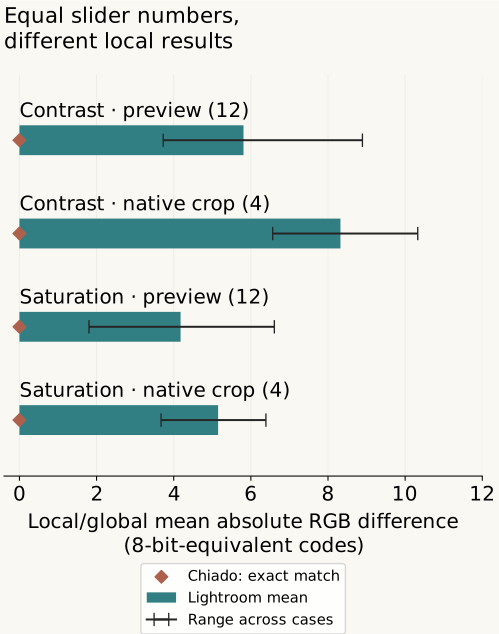
A further 64-reference capture compared the original gradient with a nearly full-frame gradient on the chart and three selected photos. Their common fully weighted regions matched exactly in Lightroom for all 16 Contrast/Saturation comparisons. The local/global differences remained. Changing the tested coverage did not explain them.
Check native pixels before changing the model
We selected the two development photos with the largest preview differences for Contrast and Saturation, then captured 22 native-resolution crop references and matching Chiado renders. Lightroom’s local/global difference persisted in all eight comparisons. Chiado’s pairs stayed exact, as did every baseline repeat and zero-mask control. The mean differences ranged from 3.67 to 10.33 eight-bit-equivalent RGB codes.
The native crops were entirely inside the gradient’s fully weighted region. They do not test a gradient boundary, every local control, or independent scenes. Lightroom and Chiado produced slightly different crop dimensions, so the local/global measurements compare each editor with itself without resizing. This result also cannot identify Adobe’s internal processing order.
We have not adopted a new local Saturation or Contrast formula from these measurements. Simple Saturation models tested against the chart still left substantial residual errors. The concrete finding is narrower: calibrating the global slider does not establish that the same implementation is right inside a mask.
A local adjustment that did change
Local white balance provided a more tractable next step. We fitted six channel-gain coefficients using only four synthetic-chart settings: Temperature and Tint at −50 and +50, one control at a time. We froze those coefficients before checking photographs. The revised response changes local white balance; global white balance stays unchanged.
Across six previously used development photographs, all 24 single-control edits reduced response error in both the fully weighted region and the gradient transition. Each measurement compares an edit with that renderer’s own baseline, then compares those changes across editors. The chart averages per-case RMS errors over normalized tile means. It is not a pixel registration result or an independent-scene confidence estimate.
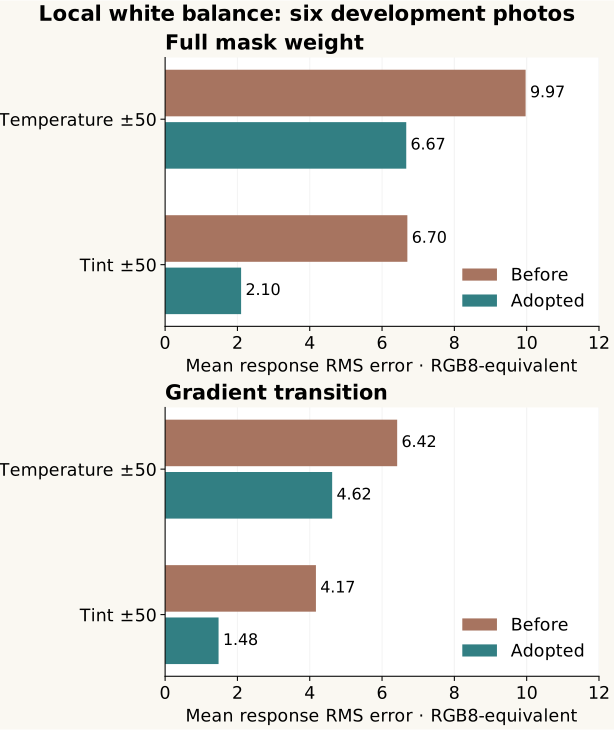
Further checks included combined Temperature/Tint edits, tone and detail backgrounds, extremes, and native crops. One important counterexample remained: Temperature +100 on an indoor development photograph moved farther from Lightroom’s baseline-relative response, even though its absolute edited appearance became closer. The native checks retained that exception. A better average does not erase it.
We adopted the revised local white-balance response after those checks. That is a concrete renderer change, not a declaration that the other local controls now match. The evidence still comes from the X2D II development pool; it does not establish transfer to independent shoots or other cameras.
The practical lesson is to keep both kinds of test. Internal consistency protects the behavior we intend within an editor. Reference comparisons test whether that intended behavior matches the other editor. Passing one cannot substitute for passing the other.
Related: what it means to match a slider and why slider combinations need their own checks.