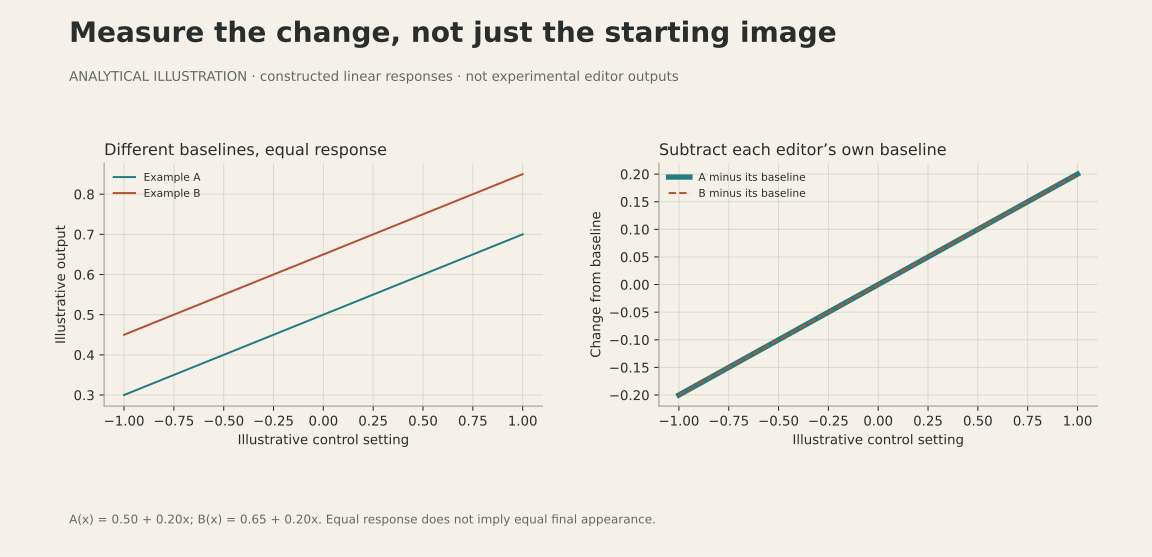
A slider can appear to improve because the starting image changed underneath it. It can also improve an average score while leaving a halo on a face or altering an unrelated control. Those are poor reasons to accept a change in a photo editor.
Chiado’s evaluation separates the starting image from the effect of the edit, then checks both the failures and the controls that should stay unchanged. Lightroom provides comparison renders for the response measurement. Native-resolution inspection and regression checks determine what that number misses. This note explains the acceptance process behind the specific fixes described elsewhere in Field notes.
Start with four renders
For one photo and one setting, export Lightroom at baseline and with the edit. Render the same pair in the candidate engine. Compare the two changes. In our harness, the comparison summarizes tone, chroma, color cast, hue and detail; it is not a simple pixel subtraction or a perceptually calibrated quality score.
The baseline matters. A brighter default rendering can make a shadow adjustment appear successful even when the control itself does very little. Comparing edited pictures alone mixes those two effects together.
The number is only one view
Our distance is a weighted engineering diagnostic. A lower value means closer agreement on the features we chose to measure. It does not mean the photograph is more attractive, and a 50% reduction does not mean an editor is “50% better.” A summary can also miss the location of an artifact: a halo around a face matters even if its contribution to an image-wide score is small.
We therefore inspect troublesome cases, compare crops at native resolution where relevant, and count regressions alongside the average. We also render controls that should be unaffected. An improvement to positive Dehaze should not quietly change the zero setting or negative Dehaze.
Automation makes the experiment repeatable
A Lua plugin applies explicit Develop settings in Lightroom Classic, exports reference TIFFs and records the settings. The evaluation uses frozen candidate binaries and fingerprints its inputs. Resetting settings between variants is essential: an unnoticed leftover color grade would contaminate the next measurement.
The scope stays narrow. These experiments use Lightroom Classic 15.6 and Hasselblad X2D II RAWs. They measure selected controls and combinations, not equivalence between two complete applications. The comparison answers one narrow question about response. Deciding whether to keep a change also requires looking at the photographs, testing combinations and checking the behavior the app needs to preserve.
What this changes for Chiado
The process produces decisions you can inspect: the Dehaze revision kept 66 unrelated renders pixel-identical; the Texture follow-up reviewed all nine complete-edit regressions; a proposed Dehaze/curve change was rejected when its improvement did not transfer. Those results are more useful evidence than an isolated “better” score. They are development checks on X2D II photographs, not a guarantee for every scene.