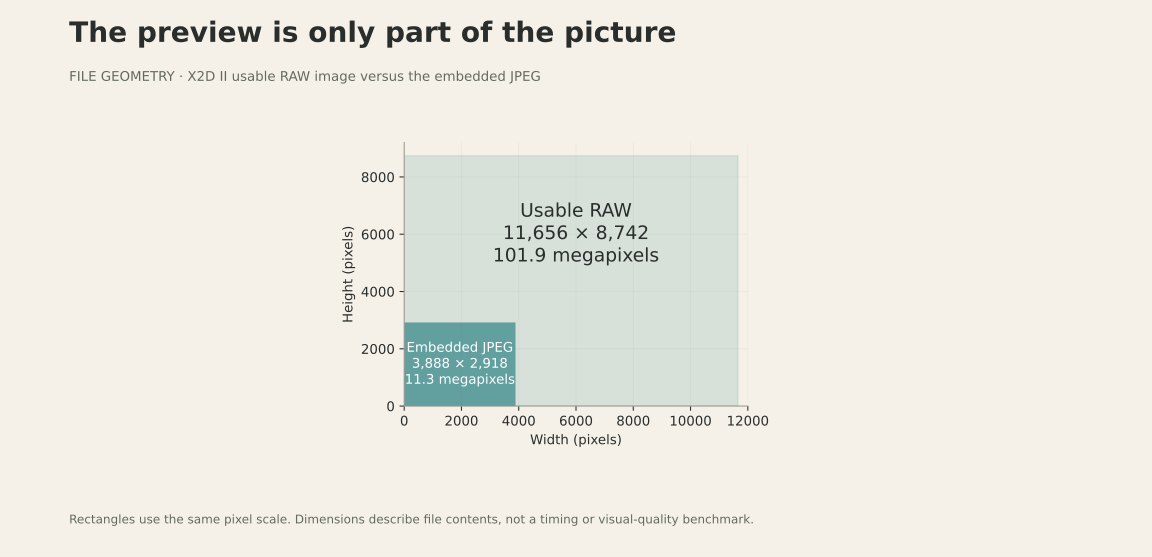
In the September 2026 tests, an X2D II file could look normal in the system viewer while the RAW development path returned an empty image. The visible fallback was an approximately 11-megapixel JPEG inside a file containing about 100 megapixels of usable sensor data. That distinction matters when you zoom in or develop the photograph.
How Chiado gets to the original image
Chiado has its own X2D II RAW engine. Its decoding was checked byte for byte against LibRaw, giving the app sensor data to develop rather than relying on that failing system path. The app is built around importing a shoot, culling it, and developing the keepers on iPad. The decoding check establishes the input data; it does not claim identical color rendering to another editor.
What a .3FR file is
The X2D II's RAW format is a TIFF with DNG-style tags, and it is uncompressed: 16 bits for every one of the sensor's 11904 × 8842 photosites, which is why each file is about 212 MB. The usable image is 11656 × 8742 (the 100 megapixels on the box). Alongside the sensor data, every file carries the camera's own rendering as a 3888 × 2918 JPEG — about 11 megapixels.
The tags are the same ones a DNG uses: black and white levels, the active area, a colour matrix, the white balance as shot, and a baseline exposure. That last one matters more than it looks: the X2D II records it per photo (0, +1 or +2 stops), darkening some shots to protect the highlights and expecting the developer to brighten them again.
Why you only see the preview
Apple lists the X2D II 100C among its supported RAW cameras, and the support file for it is installed. But when we asked Apple's RAW engine to develop these files, it opened them and returned an empty image— zero by zero pixels, and the default white balance instead of the file's own. So anything built on it, including Photos and Files, falls back to the embedded 11-megapixel JPEG. That's what "looks fine until you zoom" is.
The data itself is fine. The same file, with only a DNG version tag added and handed to Apple's DNG path, develops at full size with the right white balance; LibRaw reads it too. The fault is in Apple's.3FR path. We tested on macOS 26.2 and in the iPadOS 26 simulator (September 2026), and have drafted a bug report for Apple; a future update may fix it.
Other routes, and where Chiado fits
- Hasselblad's Phocus on a Mac, and the free Phocus Mobile 2 on an iPad, develop X2D II RAWs with Hasselblad's own colour.
- Converting to DNG on a computer makes the files readable by anything that reads DNG — at the cost of a second 200-MB file per frame.
- Chiado, the app this article came out of, has its own RAW engine for the X2D II — decoding matches LibRaw byte for byte — and is built for going through a whole shoot on an iPad: import from the card, cull, then develop the keepers. It's in private beta;the waitlist is here.
Checking a file yourself
On a Mac, sips -g pixelWidth yourfile.3FR asks Apple's image engine how wide the photo is. For an X2D II file it answers <nil>: it can't read the image's size at all, which is the same failure. Try it on a RAW from a camera Apple does develop and you'll get a number.
What this changes for Chiado
The app’s RAW development does not depend on the system path that failed in these tests. It can use the original sensor samples as the starting point for editing. The Apple-path observations are scoped to macOS 26.2 and the iPadOS 26 simulator tested in September 2026; subsequent system updates may behave differently.